When engineers search for the smallest USB camera, physical dimensions are only one part of the decision. A miniature camera still needs to provide the required image detail, field of view, working distance, frame rate and reliable USB communication while fitting inside a limited enclosure.
The right small USB camera module therefore depends on the complete combination of image sensor, lens diameter, PCB or FPC structure, USB processing electronics and cable design. This guide explains how to select a miniature USB camera for endoscopes, inspection tools, robotics, IoT devices and other embedded vision products.
Quick Answer:The smallest USB camera is not simply the camera with the lowest-resolution sensor. The final size is usually determined by the sensor package, lens barrel, PCB/FPC layout, USB bridge or ISP electronics, connector and cable. For highly space-constrained products, engineers should define the available camera envelope first and then select the sensor, lens and USB architecture around that mechanical requirement.
Smallest USB CameraMiniature USB CameraTiny USB CameraEmbedded CameraUSB Camera Module
What Is a Small USB Camera Module?
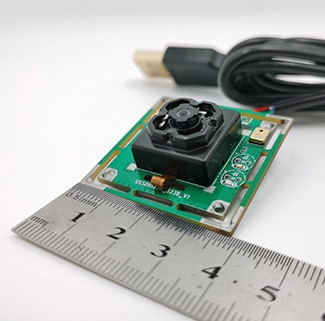
A small USB camera module is a compact imaging board that combines an image sensor, optical lens and the electronics required to output video through USB. Unlike a bare MIPI sensor module, a USB camera normally includes additional processing or bridge circuitry so the host system can receive a usable USB video stream.
Many compact modules are designed around the USB Video Class, or UVC, architecture. UVC standardization can simplify integration because supported operating systems can communicate with compatible USB video devices through established driver frameworks.
The official USB-IF Video Class documentation provides the underlying specifications for USB Video Class devices.
How Small Can a USB Camera Module Be?
There is no single universal size that defines the smallest USB camera. Two modules with the same resolution can have very different dimensions because physical size depends on several components around the image sensor.
| Component | How It Affects Size | Design Consideration |
|---|
| Image Sensor | Sensor package and optical format influence board and lens dimensions. | Do not select resolution without checking package size and pixel performance. |
| Lens | Lens diameter and total track length can exceed the PCB dimensions. | M4, M8 and low-profile lens options can reduce optical volume. |
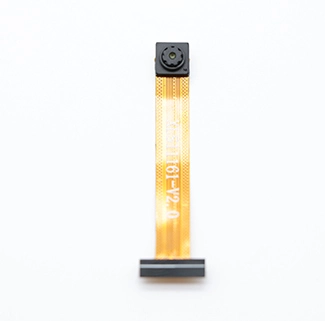
| PCB / FPC | Rigid board shape determines width and component placement. | Custom FPC can move electronics away from the sensor head. |
| USB Electronics | Bridge, ISP, memory and power circuitry consume PCB space. | Higher processing requirements may increase board area and heat. |
| Connector | A standard USB connector can be larger than the camera head. | Flying cable or FPC-based designs can save local space. |
| Enclosure | Mounting structure and optical opening add final product volume. | Define the available mechanical envelope before final camera design. |
DESIGN EXAMPLE
Ultra-Compact Camera for Tight Embedded Spaces
CK Vision's 0.3MP small USB camera uses a compact 1/10-inch image sensor, an M4 lens and USB 2.0 output. The module supports 640 × 480 video at 30 fps and is designed for applications where the camera head must remain extremely compact.
For engineers developing endoscopes, narrow inspection devices or embedded instruments, this type of architecture demonstrates why sensor format, lens diameter and PCB design are often more important than megapixel count alone.
Resolution vs Camera Size: Is Higher Resolution Always Better?
One of the most common mistakes when selecting a miniature USB camera is choosing the highest available megapixel count without considering the actual imaging task.
Higher resolution can provide more detail, but it can also increase sensor size, image bandwidth, processor workload, heat generation and lens requirements. If the application only needs to identify a nearby object inside a narrow pipe or endoscope, a lower-resolution sensor may produce a smaller and more efficient camera architecture.
| Resolution Class | Typical Design Priority | Possible Applications |
|---|
| 0.3MP / VGA | Minimum size, low bandwidth and basic visual inspection | Endoscopes, narrow inspection tools, simple embedded monitoring |
| 720p | Balance between image detail and compact architecture | Robotics, IoT terminals, portable inspection devices |
| 1080p | Higher detail while retaining manageable embedded integration | Machine vision, scanners, smart terminals, robotics |
| 5MP and Above | Fine detail, cropping capability and high-resolution imaging | Document capture, inspection, measurement and specialized imaging |
Selection Tip:Start with the smallest image detail that the system must reliably resolve. Then calculate the required resolution from working distance, field of view and target size instead of selecting megapixels first.
M4 vs M8 vs M12 Lens for a Miniature USB Camera
The lens is frequently the tallest or widest component of a tiny USB camera. Choosing the right lens diameter can therefore have a major impact on the final product enclosure.
| Lens Type | Main Advantage | Best Consideration |
|---|
| M4 Micro Lens | Extremely compact optical structure | Very narrow camera heads and endoscopic designs |
| M8 Lens | Good balance between size and optical flexibility | Compact robots, IoT devices and inspection systems |
| M12 Lens | Broad range of focal lengths and optical designs | Applications with more enclosure space or demanding optical requirements |
Lens diameter should not be evaluated alone. Engineers should also define field of view, focal length, working distance, distortion, aperture and total track length. A small-diameter lens that cannot resolve the sensor adequately may reduce the value of selecting a higher-resolution sensor.
CK Vision also provides different optical options through its camera lens solutions for projects that require customized FOV or mechanical dimensions.
USB 2.0 vs USB 3.0 for a Small Camera Module
A miniature USB camera does not automatically need USB 3.0. The interface should match the actual resolution, frame rate and video format required by the application.
USB 2.0 Better for Lower-Bandwidth Compact DesignsUSB 2.0 can be sufficient for lower-resolution or compressed video streams and may simplify cost, power and PCB requirements in very small embedded cameras. | USB 3.0 Better for High Resolution or High Frame RateUSB 3.0 provides significantly more bandwidth and is better suited to high-resolution, high-frame-rate or lower-compression imaging, although the required electronics can influence board design. |
If your project requires more bandwidth, explore CK Vision's USB 3.0 camera modules or see our detailed guide on how to choose a USB 3.0 camera for machine vision and robotics.
UVC Compatibility and Embedded System Integration
For many engineers, the biggest advantage of a USB camera is not the connector itself but the software ecosystem around UVC-compatible devices.
On Windows, Microsoft provides a system USB Video Class driver for compatible UVC devices. Microsoft explains that hardware following the UVC specification can use the system-supplied driver instead of requiring a separate proprietary camera driver. See the Microsoft USB Video Class Driver Overview.
Linux also includes the uvcvideo driver framework for USB Video Class devices. Developers working with Linux-based embedded systems can reference the Linux Kernel UVC driver documentation.
Important:UVC compatibility should still be tested on the actual host platform. Operating-system version, USB host controller, available bandwidth, application framework and custom camera controls can all affect final integration.
Fixed Focus or Autofocus for a Tiny USB Camera?
Focus architecture also affects module size. A fixed-focus lens has fewer mechanical components and is normally easier to package into a miniature camera head. It is often suitable when the working distance is known in advance.
Autofocus can provide more flexibility when the subject distance changes, but the actuator, lens stack and control requirements generally increase mechanical complexity.
Choose Fixed Focus When✓ Working distance is predictable ✓ Minimum camera size is important ✓ Mechanical simplicity is preferred ✓ The application requires stable repeatability | Choose Autofocus When✓ Target distance changes frequently ✓ One camera must image several depth ranges ✓ Mechanical space allows an AF actuator ✓ Focus flexibility is more important than minimum size |
Where Are Miniature USB Cameras Used?
Endoscopes and Inspection ToolsA narrow camera head can be integrated into equipment used to inspect pipes, cavities, machinery or other difficult-to-access spaces. | RoboticsA tiny USB camera can fit inside robot joints, grippers or compact mobile platforms where space and weight are limited. |
Medical Equipment DevelopmentCompact camera modules can be integrated into visualization equipment where the camera head must fit into a tightly controlled mechanical structure. | IoT and Smart DevicesMiniature cameras are also used in kiosks, smart terminals, embedded monitoring systems and compact AI devices where enclosure space is restricted. |
How to Specify the Right Small USB Camera Module
Before asking a camera manufacturer for the smallest possible module, provide the engineering requirements that actually define the product.
1 | Define Maximum Camera Dimensions Specify the available width, height, depth and lens opening inside the enclosure. |
2 | Define the Imaging Target Provide object size, working distance, required field of view and the smallest feature that must be visible. |
3 | Set Resolution and Frame Rate Choose only the resolution and frame rate required by the application rather than automatically selecting the highest specification. |
4 | Confirm USB Interface and Host Specify USB 2.0 or USB 3.0, operating system, host processor and required output formats. |
5 | Define Custom Mechanical Requirements Include FPC length, PCB shape, mounting holes, cable direction, connector position and lens height. |
Small USB Camera Module FAQs
What is the smallest USB camera available?
There is no single standard smallest size. Camera dimensions depend on the sensor, lens, USB electronics, PCB/FPC design and connector. Custom camera modules can often be redesigned around a specific enclosure.
Can a miniature USB camera support 1080p?
Yes. Compact 1080p USB cameras are possible, but engineers must consider sensor package size, required bandwidth, lens resolving capability, heat and PCB space.
Is an M4 lens better than an M8 or M12 lens?
Not necessarily. M4 lenses are useful when minimum diameter is critical, while M8 and M12 lenses generally provide more optical configuration options. Lens choice should be based on sensor size, FOV, working distance and image-quality requirements.
Should a tiny USB camera use USB 2.0 or USB 3.0?
USB 2.0 may be sufficient for lower-resolution or compressed video. USB 3.0 is usually preferable when the application requires higher resolution, high frame rate or more uncompressed image data.
Does a small USB camera need a special driver?
A properly implemented UVC-compatible camera can use standard UVC support on many host systems. However, platform compatibility and any vendor-specific controls should still be tested on the final operating system and hardware.
Can the PCB, FPC and lens be customized?
Yes. For OEM embedded camera projects, CK Vision can adjust PCB or FPC structure, lens selection, field of view, cable design and other mechanical parameters according to the target device.
Need a Miniature USB Camera for a Space-Constrained Device?
Send CK Vision your available camera dimensions, target resolution, working distance, field of view, USB interface and host platform. Our engineering team can help evaluate the image sensor, micro lens, PCB/FPC structure and USB architecture for your embedded vision project.
Explore Small USB CamerasExplore USB Camera ModulesDiscuss Your Camera Project