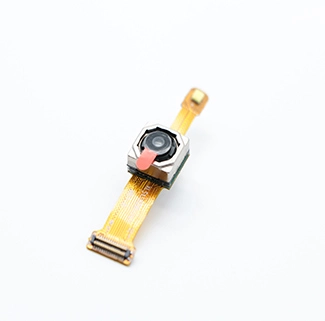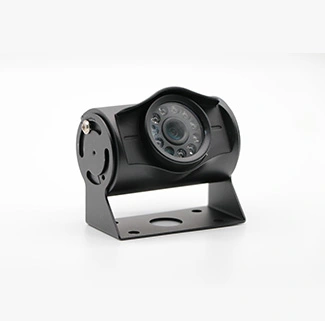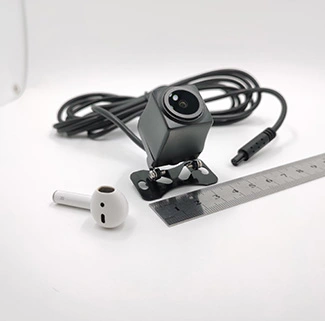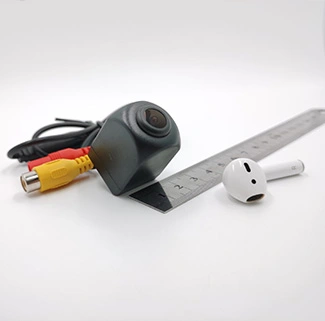
Whether an OV5648 camera needs a separate driver depends on how the sensor is integrated into the final product. An OV5648 USB camera module and a raw OV5648 MIPI camera may use the same image sensor, but their host-side software requirements are very different.
A completed UVC USB camera normally communicates with Windows, Linux or another supported host through a standard USB video driver. The host does not control the OV5648 sensor directly. Instead, a USB bridge, image signal processor and internal firmware configure the sensor and convert its RAW image data into a USB video stream.
A raw OV5648 MIPI module works differently. It connects directly to the MIPI CSI interface of an embedded processor and usually requires a platform-specific sensor driver, device-tree configuration, power sequencing, clock control, ISP integration and image tuning.
This guide explains the difference between UVC and MIPI camera integration and shows when an OV5648 project requires a standard driver, a custom driver or additional firmware development.
What Is an OV5648 USB Camera Module?
The OV5648 is a 5MP CMOS image sensor with a maximum image size of approximately 2592 × 1944. Its native interface is MIPI, and the sensor itself does not directly output USB video.
To create a complete USB camera module, the OV5648 must be combined with additional hardware and firmware, which may include:
An image signal processor or USB bridge controller;
Sensor-control firmware;
USB Video Class descriptors;
MJPEG or YUYV video output;
A power-management circuit;
A lens and optional IR-cut filter;
A PCB or FPC structure;
A USB cable and connector.
CK Vision’s OV5648 USB camera module combines the OV5648 sensor with a USB 2.0 UVC architecture. The PCB or FPC, lens, working distance, field of view, cable and connector can be evaluated according to the embedded application.
Does an OV5648 USB Camera Need a Separate Driver?
A UVC-compliant OV5648 USB camera usually does not need a separate OV5648 sensor driver on the host system. It normally uses the USB Video Class driver already included with a compatible operating system.
The host identifies the product as a USB video device rather than as an individual OV5648 image sensor. Communication with the OV5648 occurs internally between the sensor and the USB bridge or ISP.
The USB Video Class specification defines a standardized framework for transferring video and exposing camera controls between a compliant USB camera and a host.
| Camera Type | Host-Side Driver Requirement | Who Controls the OV5648 Sensor? |
|---|---|---|
| OV5648 UVC USB camera | Normally uses the operating system’s UVC driver | USB bridge, ISP and internal firmware |
| OV5648 MIPI camera | Requires a platform-specific sensor driver | Embedded processor, kernel driver and ISP framework |
| OV5648 USB camera with proprietary functions | May require an SDK, extension control or application software | Bridge firmware and host application |
| Customized non-UVC USB camera | May require a vendor-specific driver | Custom USB firmware and host software |
UVC Camera Driver vs OV5648 Sensor Driver
The terms “UVC driver” and “OV5648 driver” describe different layers of a camera system.
What Is a UVC Driver?
A UVC driver allows an operating system to communicate with a camera that follows the USB Video Class standard. It handles device enumeration, video streaming, supported formats and standard camera controls.
Depending on the module firmware, available UVC controls may include:
Brightness;
Contrast;
Saturation;
Sharpness;
Exposure;
Gain;
White balance;
Focus;
Zoom or other project-specific controls.
The UVC driver communicates with the USB bridge. It does not normally access OV5648 registers directly.
What Is an OV5648 Sensor Driver?
An OV5648 sensor driver is used when the sensor is connected directly to the camera interface of an embedded processor, usually through MIPI CSI.
The sensor driver is responsible for functions such as:
Detecting the sensor over I2C;
Configuring sensor registers;
Setting resolution and frame rate;
Controlling exposure and analog gain;
Starting and stopping the image stream;
Managing reset and power-down pins;
Controlling clocks and power rails;
Reporting sensor formats to the camera framework.
This type of driver is normally specific to the processor platform, kernel version, camera interface and ISP architecture.
How an OV5648 UVC USB Camera Works
An OV5648 UVC USB camera contains several processing stages between the image sensor and the host computer.
The OV5648 captures RAW image data. Light is converted into pixel data by the sensor.
The bridge or ISP configures the sensor. Internal firmware writes the required OV5648 registers and selects the imaging mode.
The ISP processes the RAW image. The processing pipeline may perform demosaicing, exposure, white balance, noise reduction, color correction and sharpening.
The image is converted into a USB video format. The final module may output MJPEG, YUYV or another supported format.
The host UVC driver receives the stream. The operating system presents the camera to applications as a standard video device.
This architecture is why an OV5648 USB camera does not normally require the host to load a separate OV5648 sensor driver.
OV5648 USB Camera Integration on Windows
Most modern Windows systems include a standard USB Video Class driver. A correctly configured UVC camera can normally be recognized as a video device without installing a sensor-specific driver.
However, plug-and-play recognition does not prove that every camera function will operate as required. The development team should still confirm:
Whether the required resolution is listed;
Whether the target frame rate is available;
Whether MJPEG or YUYV is supported;
Whether exposure, gain and white-balance controls are accessible;
Whether the camera works with the target application;
Whether the selected cable provides stable power and data transmission.
A proprietary driver or SDK may be required if the project uses vendor-specific USB commands, nonstandard controls, hardware trigger functions or custom synchronization features that are not exposed through standard UVC controls.
OV5648 USB Camera Integration on Linux
A UVC-compliant OV5648 USB camera is normally handled by the Linux uvcvideo driver. The camera is typically exposed to applications through a V4L2 video device node such as /dev/video0.
The official Linux UVC driver documentation explains UVC-specific controls and extension-unit handling, while the V4L2 API documentation describes how Linux applications interact with video devices.
Basic Linux Validation
After connecting the camera, engineers can first confirm whether Linux has enumerated the USB device and created a video node.
lsusb
dmesg | tail
v4l2-ctl --list-devices
v4l2-ctl --list-formats-ext -d /dev/video0
These commands can help determine:
Whether the USB camera is detected;
Which video device node was created;
Which resolutions are available;
Which pixel formats are supported;
Which frame rates are reported by the firmware.
The reported formats and frame rates should be tested under continuous streaming. A mode appearing in the descriptor does not automatically prove that the host, USB controller and application can maintain it reliably.
Linux UVC Controls
Standard and supported camera controls can be inspected with:
v4l2-ctl -d /dev/video0 --list-ctrls
If a required control is not listed, the reason may involve:
The control is not implemented in the camera firmware;
The function is exposed through a UVC extension unit;
The bridge chip does not support the function;
The control requires a vendor SDK;
The kernel does not include the necessary extension mapping.
Custom UVC controls may require coordination between bridge firmware, USB descriptors and Linux application software.
OV5648 MIPI Camera Integration on Linux
A raw OV5648 MIPI camera does not use the Linux UVC driver. It normally requires a sensor driver and integration with the processor’s MIPI CSI receiver, media framework and ISP.
A typical Linux MIPI camera integration may include:
Adding or adapting an OV5648 kernel sensor driver;
Configuring the I2C bus and sensor address;
Defining regulators, clocks and GPIOs;
Setting reset and power-down timing;
Configuring the MIPI lane count and link frequency;
Describing endpoints in the device tree;
Connecting the sensor to the CSI and ISP media graph;
Defining supported resolutions and pixel formats;
Calibrating exposure, white balance and image-quality parameters.
Projects that need support with these tasks can use CK Vision’s camera sensor driver support for platform adaptation, driver development and sensor integration.
Common MIPI Driver Problems
A raw OV5648 camera may fail to stream even when the I2C bus can detect the sensor. Common causes include:
Incorrect external clock frequency;
Wrong reset or power sequence;
Unsupported regulator voltage;
Incorrect MIPI lane configuration;
Link-frequency mismatch;
Invalid sensor register settings;
CSI receiver configuration errors;
Device-tree endpoint mistakes;
Missing ISP format support.
If the camera is detected but the image contains lines, abnormal colors, flicker, frame loss or unstable exposure, additional camera sensor debugging may be required to examine register settings, power integrity, MIPI timing, electromagnetic interference and thermal conditions.
OV5648 USB Camera Integration on Android
Android USB camera integration depends on the hardware platform, USB host support, camera framework, operating-system build and application.
In USB host mode, an Android-powered device acts as the USB host, supplies bus power and enumerates the connected USB device. The official Android USB host documentation explains the platform’s USB host model and application-level device access.
Before selecting an OV5648 USB camera for Android, confirm:
The Android device supports USB host or OTG mode;
The port can provide sufficient power;
The kernel includes UVC support;
The camera resolution and format are supported;
The application can access the external camera;
The USB connector and cable are compatible;
The camera remains stable during continuous operation.
Android External Camera Provider
Android Open Source Project documentation describes an external camera provider that can enumerate compatible external USB cameras and expose them through the Android camera framework. The implementation is described in the official Android external USB camera documentation.
Availability varies between devices because hardware manufacturers may modify the kernel, camera HAL, USB configuration and system image. Therefore, a UVC camera that works on one Android terminal may not automatically work on another.
Direct USB Access Through an Android Application
Some applications communicate with a UVC camera directly through Android USB host APIs rather than exposing it through the standard Camera2 framework.
This approach may require:
USB device enumeration;
User permission to access the USB device;
UVC descriptor parsing;
Video-stream negotiation;
MJPEG or YUYV decoding;
Application-level camera controls;
USB disconnection and reconnection handling.
Whether the project should use the Android camera framework or direct USB communication depends on the system build, application architecture and level of control required.
OV5648 MIPI Camera Integration on Android
A raw OV5648 MIPI module connected to an Android processor requires deeper platform integration than an external UVC camera.
The integration may involve:
Linux kernel sensor driver;
Device-tree configuration;
MIPI CSI and ISP setup;
Camera HAL integration;
Camera metadata configuration;
Resolution and stream definitions;
Exposure and white-balance tuning;
Compatibility testing with Camera2 applications.
The exact process depends on the processor platform, such as Rockchip, MediaTek, Qualcomm, Allwinner or another embedded SoC.
After the driver can produce a stable image, professional ISP tuning services may be required to optimize exposure, white balance, color reproduction, noise reduction, sharpness and low-light image quality.
UVC vs MIPI Integration: Key Differences
| Comparison Item | OV5648 UVC USB Camera | OV5648 MIPI Camera |
|---|---|---|
| Connection | USB 2.0 or USB 3.0 through a bridge controller | MIPI CSI connected directly to the processor |
| Host driver | Normally uses a standard UVC driver | Requires a platform-specific sensor driver |
| Image processing | Performed inside the USB module | Usually performed by the processor’s ISP |
| Integration difficulty | Lower for standard host systems | Higher because kernel, device tree, CSI and ISP must be integrated |
| Image-tuning control | Depends on bridge firmware and UVC controls | Can provide deeper platform-level ISP access |
| CPU usage | Depends on USB format and host decoding | Depends on ISP and camera pipeline architecture |
| Cable flexibility | USB cable can simplify external or modular installation | MIPI trace length is normally more restricted |
| Best suited to | External cameras, embedded terminals and faster integration | Integrated products requiring direct camera-pipeline control |
When Is a Custom OV5648 Driver Required?
A custom sensor driver is generally required when the OV5648 is connected directly to the MIPI CSI interface of an embedded processor and the existing software platform does not already support the exact sensor configuration.
Custom driver work may also be needed when:
The kernel version differs from the available reference driver;
The board uses a different clock, GPIO or regulator design;
A new resolution or frame-rate mode is required;
The module uses a customized sensor register table;
The processor’s CSI or ISP architecture differs from the reference platform;
The device tree does not include the required media endpoints;
The camera must support suspend, resume or low-power operation;
The project requires custom exposure, gain or synchronization behavior.
A standard UVC USB camera normally avoids this sensor-driver development because the bridge firmware handles the OV5648 internally.
When Does a UVC Camera Need Custom Software?
Even when a UVC camera does not require a custom kernel driver, additional application software may still be needed.
Common examples include:
Accessing vendor-specific extension-unit controls;
Switching customized camera modes;
Controlling hardware trigger or GPIO functions;
Synchronizing multiple cameras;
Reading firmware or module information;
Updating camera firmware;
Saving RAW or uncompressed frames;
Integrating the camera with an AI or inspection application.
The software requirement should be defined before the module firmware is finalized. Adding a new control after mass production may require firmware modification and renewed compatibility testing.
Common OV5648 USB Camera Problems
| Problem | Possible Cause | Recommended Check |
|---|---|---|
| Camera is not detected | Power, cable, USB descriptor or host-controller problem | Check enumeration logs, voltage and another host port |
| No video device appears on Linux | UVC driver missing or camera descriptor problem | Check kernel configuration, dmesg and lsusb |
| Required resolution is missing | Firmware descriptor does not expose the mode | Review bridge firmware and UVC descriptors |
| Low or unstable frame rate | Bandwidth, cable, decoding or host-performance limitation | Test another format, resolution, cable and host controller |
| Android cannot open the camera | Missing UVC, OTG, power or application support | Confirm host mode, kernel support and app permissions |
| Image color is abnormal | ISP, white balance, sensor register or format issue | Review firmware, format negotiation and ISP parameters |
| Camera disconnects during operation | Voltage drop, cable quality or electromagnetic interference | Measure power at the module and test cable shielding |
| Controls do not respond | Control not implemented or requires an extension unit | Inspect UVC controls and bridge-firmware support |
How to Choose Between OV5648 UVC and MIPI
| Project Requirement | Recommended Direction |
|---|---|
| Fast integration with Windows or Linux | UVC USB camera module |
| External or replaceable camera connection | UVC USB camera module |
| Direct integration into an embedded processor | MIPI camera module |
| Deep ISP parameter control | MIPI camera integrated with the processor ISP |
| Limited kernel-development resources | Validated UVC USB module |
| Custom camera HAL and integrated product design | MIPI camera module |
| Longer detachable cable | USB camera, subject to signal validation |
| Lowest possible image latency | Evaluate the complete MIPI and USB pipelines through testing |
For embedded IoT devices that need standard USB integration, the camera can also be evaluated together with the target use cases described on CK Vision’s IoT camera application page.
Information to Provide Before Requesting Driver Support
To evaluate an OV5648 driver or USB integration project, provide:
Camera type: USB UVC, MIPI or DVP;
Processor or SoC model;
Operating system and kernel version;
Camera module schematic;
Sensor clock frequency;
MIPI lane configuration;
Required resolution and frame rate;
Required video format;
Device-tree files;
Existing driver source code;
Boot and kernel logs;
Photos or samples of the current image problem;
Target schedule and estimated production volume.
For a UVC project, also provide the USB VID/PID, bridge-controller model, supported descriptors, target host systems and required custom camera controls.
Frequently Asked Questions
Does an OV5648 USB camera require an OV5648 driver on Windows?
A UVC-compliant OV5648 USB camera normally uses the standard Windows USB video driver rather than a separate OV5648 sensor driver. Additional software may still be required for vendor-specific controls or custom functions.
Does an OV5648 USB camera work on Linux?
It can work on Linux when the module is UVC compliant and the kernel includes uvcvideo support. The available resolutions, formats and controls should be verified with the final camera firmware and target Linux system.
Does OV5648 need a driver on Android?
An external UVC USB camera normally relies on Android USB host and UVC support rather than a raw OV5648 sensor driver. A direct MIPI OV5648 camera requires kernel, device-tree, ISP and camera-framework integration.
What is the difference between an OV5648 USB driver and MIPI driver?
A USB camera uses a UVC or vendor-specific USB driver to communicate with the completed module. A MIPI driver controls the OV5648 sensor directly and configures its clocks, power, registers, resolution and streaming behavior.
Why is my OV5648 USB camera detected but not streaming?
Possible causes include an unsupported format, incorrect USB descriptor, insufficient bandwidth, unstable power, cable problems or host decoding limitations. Review the reported formats and test the camera with another host and cable.
Can the OV5648 USB camera support custom UVC controls?
Custom controls may be supported through standard UVC controls or vendor-specific extension units. Availability depends on the USB bridge, firmware and host software implementation.
Can one OV5648 driver be used on every embedded platform?
Not usually. MIPI sensor drivers often require adaptation for the processor, kernel version, clock, GPIO, regulator, CSI receiver and ISP framework of the target platform.
Is UVC or MIPI better for an embedded product?
UVC is generally easier for standard USB host integration, while MIPI provides tighter integration with the processor’s native camera and ISP pipeline. The better option depends on development resources, image-quality requirements, enclosure design and host architecture.
Conclusion
An OV5648 USB camera does not normally need a separate OV5648 sensor driver when it is configured as a UVC device. The USB bridge, ISP and internal firmware control the sensor, while the host operating system uses its standard USB video driver.
A raw OV5648 MIPI camera is different. It usually requires a sensor driver, device-tree configuration, MIPI CSI integration, ISP support and image-quality tuning for the selected Linux or Android platform.
Before selecting UVC or MIPI, engineers should evaluate the host processor, operating system, USB or CSI interface, image-processing requirements, available development resources and product structure. Testing the complete camera, host, firmware and application together is necessary before confirming production compatibility.
For an engineering evaluation, provide CK Vision with the processor model, operating system, kernel version, interface, resolution, frame rate, schematic, device tree and current test results. This information helps determine whether the project requires a standard UVC module, custom firmware, sensor-driver development or full camera-pipeline debugging.